
How to stop doomscrolling, especially at night
Infinite feeds are built to never end. Instead of relying on your willpower at midnight, give them an ending: a time, a duration, a pause.
It's 11:40 pm. You only meant to check one thing before bed, and your thumb has been scrolling through videos you won't remember tomorrow for half an hour. That reflex has a name, doomscrolling, and it isn't a lack of willpower: infinite feeds are built to never give you an ending. The good news is you can put one back. Here's how to stop doomscrolling, especially at night, without throwing your phone away.
Why it's so hard to stop
A book has a last page, an episode has end credits. An Instagram, TikTok or Reddit feed has neither: there's always one more video, and any of them might be the good one. Add evening tiredness, which makes every decision harder, and you get the perfect loop. You're not weak; the setting is rigged.
So the fix isn't to "hold on". It's to add the endings that are missing: a time after which the app won't open, a duration you pick in advance, a short stop before you go in.
What you can do tonight, without installing anything
Let your phone sleep somewhere else
The most effective tip, and the hardest to follow: charge your phone outside the bedroom, or at least out of reach of the bed. A cheap alarm clock takes care of waking up.
Android's Bedtime mode
In Settings › Digital Wellbeing › Bedtime mode (the name varies by brand), you can schedule grayscale and Do Not Disturb at a fixed time. A gray screen is surprisingly less tempting.
Mute notifications at night
A single "X posted a story" at 11 pm is enough to start another half hour. Keep calls and messages from people who matter, mute the rest.
Stop doomscrolling with Wabima
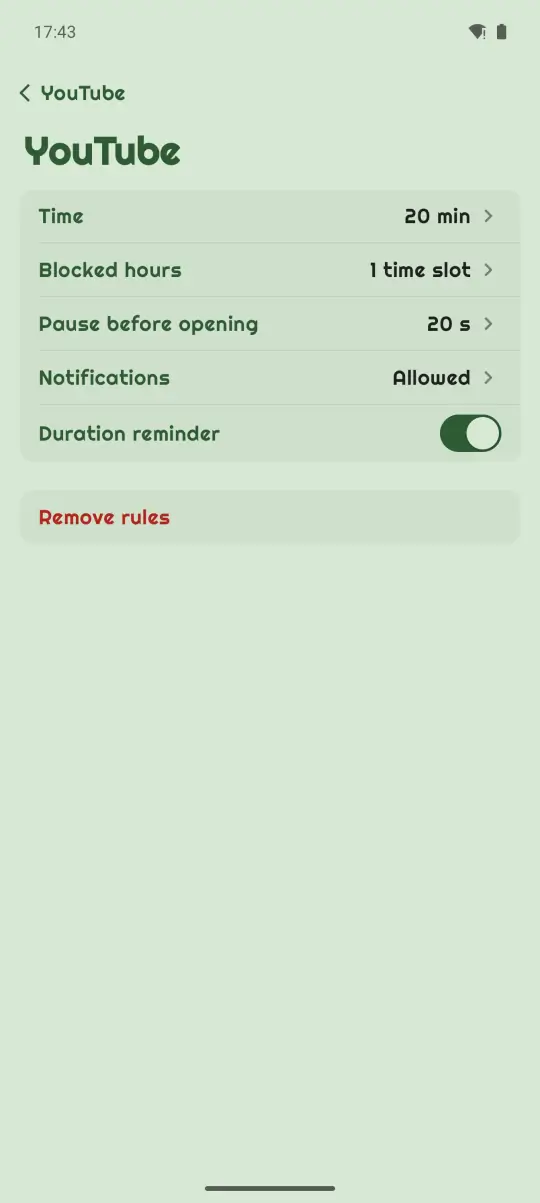
Wabima is a minimalist launcher with a built-in app blocker. Three of its rules target exactly the late-night scroll. You set them per app or for a group of apps ("social media", for example).
1. Blocked hours for your evenings
Pick a time slot, say 22:00 to 08:00: during that time the app simply won't open. The slot can cross midnight, and the block applies even if the app is already open when the time comes. That's the ending the feed was missing.
2. "How long?" before you go in
With the duration reminder, the app asks how long you want to stay when you open it: 5, 10, 15 or 30 minutes. When time's up, a full-screen reminder pulls you out of the feed. Deciding before you go in is far easier than deciding once you're inside.
3. A pause before opening
A few seconds of countdown before the app opens, which you can cancel. At night, that's often enough to notice you were opening TikTok out of habit, not because you wanted to.
The evening setup, step by step
- Install Wabima and set it as your home screen.
- Create a group with the apps you scroll the most.
- Give the group blocked hours starting one hour before bedtime.
- Add a 10-second pause to that group for the rest of the day.
- If you'd rather keep access at night, swap the blocked hours for the duration reminder.
On days you know you'll cave, strict mode locks your rules until a deadline you choose: no way to loosen them in Wabima before then.
So what do you do instead?
The late-night scroll often fills a gap: tiredness, boredom, the need to switch off. Take it away without putting something in its place and it comes back. A paper book on the nightstand, a podcast, or Wabima's offline modules (notes, sudoku, an e-book reader), which have no feed and stop when you decide.
You can try everything for free: Wabima is free for 7 days on Google Play, then a one-time purchase (€8.99, or the local price Google Play shows in your currency). Read next: how to block apps on Android without deleting them and how to reduce screen time on Android.
Guides
- Why you pay once, and why there are no trackers
- How to reduce screen time on Android without fighting yourself
- How to block apps on Android without deleting them
- Minimalist launcher: what it is and how to choose one
- The dumbphone effect, without switching phones
- Focus mode on Android: work without getting pulled into your phone