
How to block apps on Android without deleting them
Deleting Instagram is drastic, and it rarely lasts. There are finer ways to block apps: at certain hours, after a set amount of time, or just long enough to think.
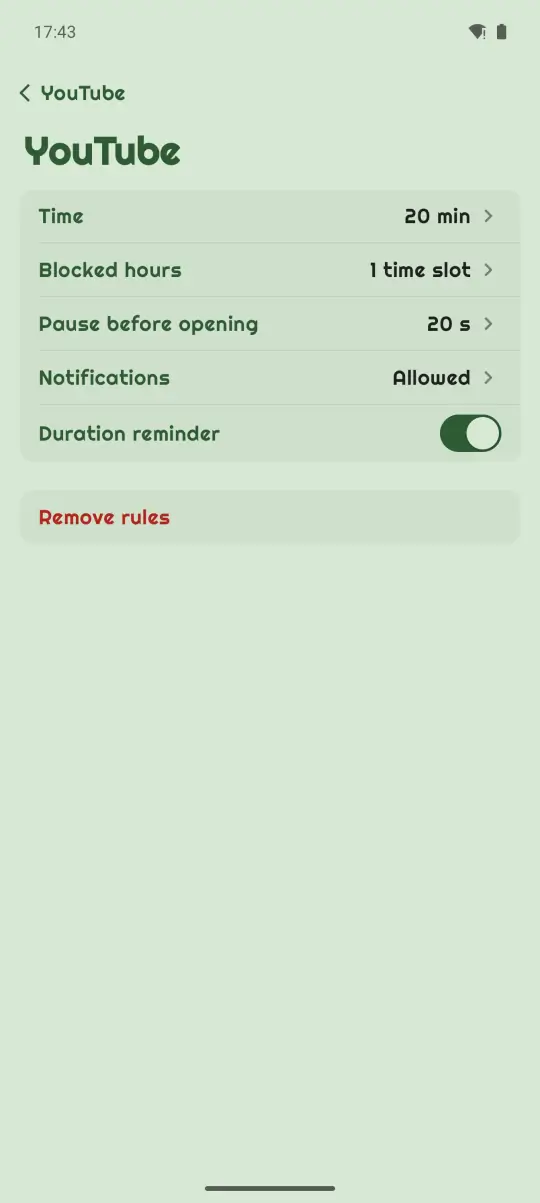
Plenty of people have deleted Instagram, TikTok or YouTube. Plenty have reinstalled them a week later, to answer a message, find a video, or simply because they missed the app. There's a finer approach: block apps on Android without uninstalling them, only when they're actually a problem. Here are your options, from gentlest to firmest, then a step-by-step guide with Wabima.
Block it completely, or slow it down?
Before picking a tool, ask yourself what actually bothers you:
- you open it without thinking, dozens of times a day: slow down the gesture;
- you stay too long once you're in: set a time limit;
- it spills into specific moments (night, work): block it at those hours;
- its notifications keep pulling you back: mute the notifications, not the app.
Each case has its own answer. Blocking everything at once rarely lasts.
Block apps on Android with built-in tools
Digital Wellbeing app timers
Under Settings › Digital Wellbeing (the name varies by brand), you can set a timer per app. When it runs out, the icon is greyed out until midnight. Simple, free and effective. To block an app only at certain hours, use a scheduled Focus mode or Bedtime mode instead (below).
Bedtime or Focus mode
Depending on your phone, a Focus mode pauses a list of apps for as long as you want, and Bedtime mode kicks in at a set time. Handy, though the options vary a lot between manufacturers.
Notifications
In the app's settings (long-press the icon › App info › Notifications), you can mute everything or keep only direct messages. Often it's the notification that triggers the open, not the desire.
Four ways to block an app with Wabima
Wabima is a minimalist launcher with a built-in app blocker. It offers several rules you can combine, per app or per group of apps.
1. Pause before opening
Before the app opens, a countdown appears, adjustable from 5 seconds to a minute. Cancel anytime, or open once the pause is over. It also applies when you come from a notification or the recent apps. It's the best tool against the reflex: nothing is forbidden, but every open becomes a choice again.
2. Daily limit
From 5 minutes to 2 hours per app. When time's up, you can leave, stay 5 or 15 more minutes, or lift the limit for the day. Tip: create a "social media" group with a shared allowance. Otherwise, once Instagram's limit is hit, you just move to TikTok.
3. Blocked hours
The app becomes unavailable during the time slots you choose, down to the minute, including slots that cross midnight (10 pm to 8 am, for example). The block kicks in even if the app is already open.
4. Focus session
A 15, 25 or 50-minute timer during which the apps you pick stay closed. Phone calls, emergency calls, the camera and settings are never blocked.
Step by step: block Instagram, TikTok or YouTube with Wabima
- Install Wabima from Google Play and set it as your home screen.
- Allow the accessibility service when asked. It's only used to know which app is open, never to read your screen.
- Long-press the app you want to slow down, then tap Rules.
- Pick Pause before opening and set a few seconds. Start there.
- If you want something firmer, add a time limit or blocked hours.
- For several similar apps, put them in a group and give the group one shared rule.
Try it for a week, then adjust. A rule that's too harsh ends up switched off; a rule that's just right fades into the background.
What if I get around my own rules?
You will, sometimes. Outside strict mode, every limit can be extended and every pause cancelled. That's on purpose: Wabima supports your self-discipline instead of forcing it. If you want one more notch, strict mode locks your rules for a day, three days, a week or with no end date: no loosening rules, no un-hiding apps, no stopping a session early.
Another drastic but reversible option: hide the app. It disappears from search and the app list, and only comes back through settings. Out of sight, out of mind.
Getting the mix right
- A pause on the apps you open on reflex.
- Blocked hours for the moments you want to protect.
- A shared limit on the group that spills over.
- Strict mode only for a specific period (exams, a crunch at work).
You can test all of this for free: Wabima is free for 7 days on Google Play, then a one-time purchase (€8.99, or the local price Google Play shows in your currency). Related reading: how to reduce screen time on Android and why Wabima is a one-time purchase.
Guides
- Why you pay once, and why there are no trackers
- How to reduce screen time on Android without fighting yourself
- Minimalist launcher: what it is and how to choose one
- The dumbphone effect, without switching phones
- How to stop doomscrolling, especially at night
- Focus mode on Android: work without getting pulled into your phone